

seats.aero is a search engine for award flights. Type in a route and a date, and it shows which mileage programs have seats and how many miles each one charges, all on one screen. The free version covers flights in the next two months, and PRO opens a full year for $9.99 a month.
The short version
- Free: search, explore and create alerts for flights departing in the next 2 months, with no account needed.
- PRO: $9.99 a month or $99.99 a year on the website for a full year of availability, live search on any route, SMS alerts and 50+ filters.
- Programs: 20+ mileage programs in one search, including United, Aeroplan, American, Delta, Flying Blue, Virgin Atlantic and Atmos Rewards.
- Booking: seats.aero only finds the seat. You book it with the airline program, usually after transferring points from a credit card.
- Savings: on our test route, picking the cheapest program saved 21,200 miles against the most expensive one for the same nonstop flight.
- Live examples: every search in this guide ran on October 12, 2026. Those seats will most likely be gone by the time you read this.
We earn a commission if you sign up for seats.aero PRO through our links, at no cost to you. Thank you for supporting TravelPointsPro.
What seats.aero does

Seeing every program on one screen matters because the same seat can cost wildly different amounts depending on which program books it. On a Chicago to Paris search we ran on October 12 for October 26, economy ranged from 18,800 Flying Blue miles to 40,000 United miles for nonstop flights on the same day. Below, we walk through every step with screenshots, so you can follow along on your own screen.
Every search and screenshot here shows real results from October 12, 2026. Other travelers search these same routes every day and book the good seats quickly, so the exact flights we found will most likely be gone when you read this. Use them to learn what a good price looks like, then run the search for your own dates.
Airline websites only show their own program’s prices, and some make even that slow, as our Avios calendar post shows. To compare, you’d search United, then Air Canada Aeroplan, then Flying Blue, then American, one site at a time. seats.aero does that work in the background and shows the results instantly.
The free tier has one real limit. Its getting started guide says “Free users can use our features for flights departing within the next two months.” Most beginners book trips further out than that, which is the main reason people upgrade.
Three things it doesn’t do. It doesn’t book tickets, it doesn’t hold seats, and its results aren’t always live, so confirm the seat on the airline’s own site before you move any points.
Free vs PRO
| Feature | Free | PRO ($9.99 a month or $99.99 a year) |
|---|---|---|
| Search window | Next 2 months | Up to a year out |
| Date range per search | ±1, ±3, ±7 or ±14 days, or a custom range | The same, across the full year |
| Live search on any route | No, cached results | Yes |
| Alerts | One-off email alerts, up to 5 active | Unlimited, plus continuous and SMS alerts |
| Filters | Programs, alliances, transfer partners, points, day of week | Adds max fees, min seats, operating airline, nonstop only and 50+ more |
| Upgrade finders | JetBlue Mint, next 60 days | Air Canada, Alaska, Emirates and United PlusPoints |
| Award finders | ANA First, Delta One, JAL First and Qsuites, next 60 days | Adds Cathay, Singapore Advantage and United cardmember space |
| Price history, seat maps, fare classes | No | Yes |
| Account needed | No for search, a sign-in for alerts | Yes |
The details come from the seats.aero sign-up page, its tools page and the help center’s free vs PRO table. The yearly plan works out to about $8.33 a month, a saving of nearly 16%. You can cancel anytime and keep access until the end of the period you paid for. Subscribe on the website rather than in the iPhone app. seats.aero explains in its help center that the iOS price can be higher because of Apple’s fees, and a website subscription still works in the app.
Pros and cons
What we like:
- One search covers 20+ programs. On our Chicago to Paris test, the cheapest program saved 21,200 miles over the most expensive one for the same nonstop seat.
- A useful free tier. Search, Explore and email alerts cost nothing for flights in the next two months, and searching needs no account.
- It speaks in your points. The Transfer Partners filter shows only programs your Amex, Chase, Citi, Capital One, Bilt or Wells Fargo points can reach.
- Fees sit next to the points. Booking Options showed the same seat for $5.60 in fees on Delta and $377 on Qantas.
- Flexible searching. Airport group codes like WST, your own custom codes and date ranges up to ±14 days cover a lot of ground in one search.
- Extras at no cost. Award finders for top first and business cabins, release-date calendars and Rooms.aero for hotel awards.
What we don’t:
- Two months is short. Most international trips get booked further out, so you’ll likely pay for PRO when you plan one.
- Results can be hours old. The data is cached, and phantom seats exist, so every find needs a check on the airline’s site.
- It doesn’t book. You still transfer points and book with the airline program yourself.
- One way only. No round trips, stopovers, open jaws or mixed-cabin trips in a single search.
- Seat counts aren’t always right. Six programs, including American and Qatar, don’t share them, which matters for families.
- A learning curve. Programs, partners and fees take a few searches to understand, and some results come from programs you can’t join.
Who it’s best for
seats.aero is a good fit if:
- Transferable points holders. You earn points on cards like the Capital One Venture X or Chase Sapphire Preferred, and want the program that charges the fewest for your trip.
- Business and first class seekers. Premium seats are scarce, and prices vary most between programs.
- Flexible travelers. Range searches and airport codes surface seats you’d miss when your dates or airports can move.
- Occasional international flyers. One or two big trips a year make a single month of PRO, at $9.99, easy to justify.
You can probably skip it if:
- Single-airline loyalists. If you only hold one airline’s miles, such as United MileagePlus, its own site shows the same seats.
- Last-minute domestic economy flyers. Airline sites and the free tier already cover trips inside two months.
- Hands-off travelers. seats.aero only searches, so a paid award booking service fits better if you want someone to do it all.
If that sounds like you, start with a free search. When you plan a trip more than two months out, add PRO for that month and cancel after you book.
How to search seats.aero, step by step
These nine steps take you from your first search to a saved alert. Each one has a numbered screenshot, and the numbers in the list below it match the callouts.
Step 1: open seats.aero
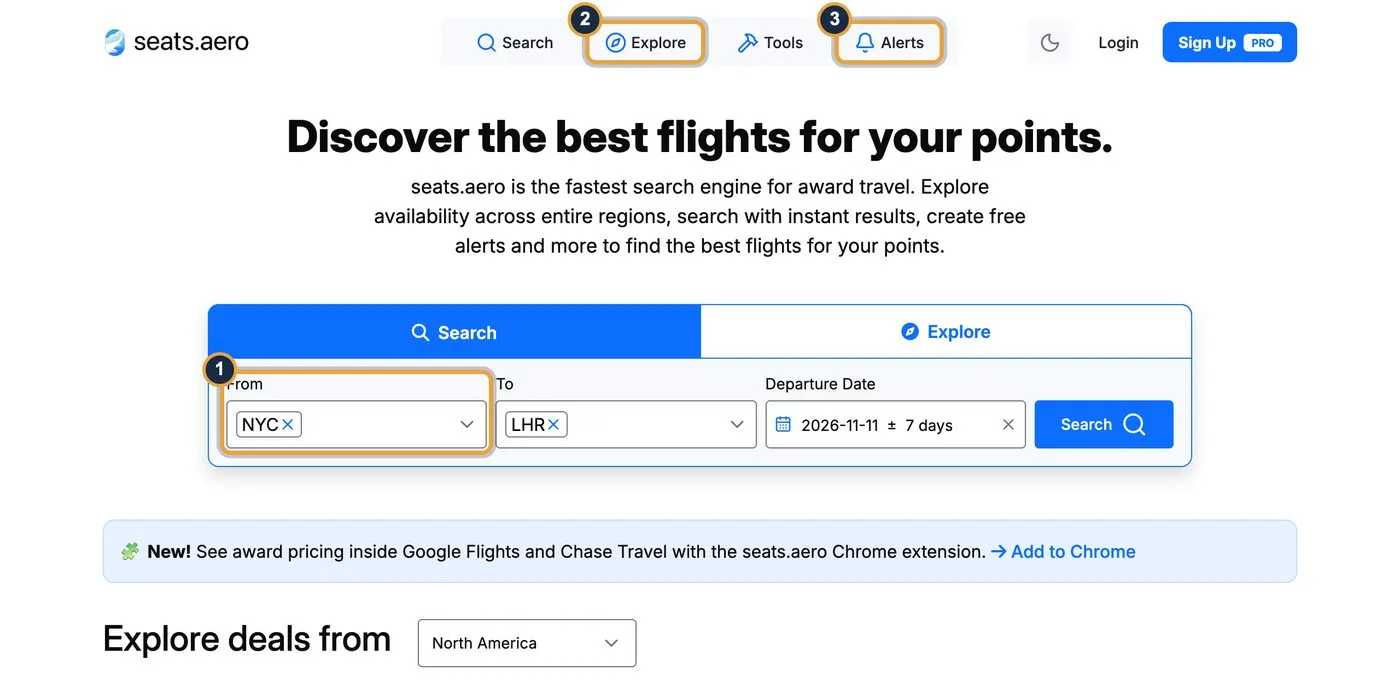
- Search box: the fastest way in. Enter where you’re flying from and to.
- Explore: browse everything one program has across a region, covered in Step 9.
- Alerts: have seats.aero email you when seats open, covered in Step 8.
You don’t need an account for any of this on the free tier.
Step 2: enter your route and date

- Origin Airports: type a city or airport code. You can add several, such as JFK and EWR, or a region code like LON for every London airport.
- Destination Airports: same rules as the origin.
- Departure Date: pick a date inside the next two months on the free tier. Open the date picker to widen it to ±1, ±3, ±7 or ±14 days, or pick a custom range. seats.aero’s date range guide gives the example of May 18 with ±7 days searching May 11 to 25.
- Search: results load in a second or two because seats.aero has already checked the programs. Searches run one way only, so press the swap arrows between the airport boxes to search your return.
To skip the typing, our link opens Chicago to Paris two weeks out with the search already filled in.
Step 3: search a whole region with one code
seats.aero lets one three-letter code stand for a group of airports. Press Multi-City Codes above the search box to see the full list.
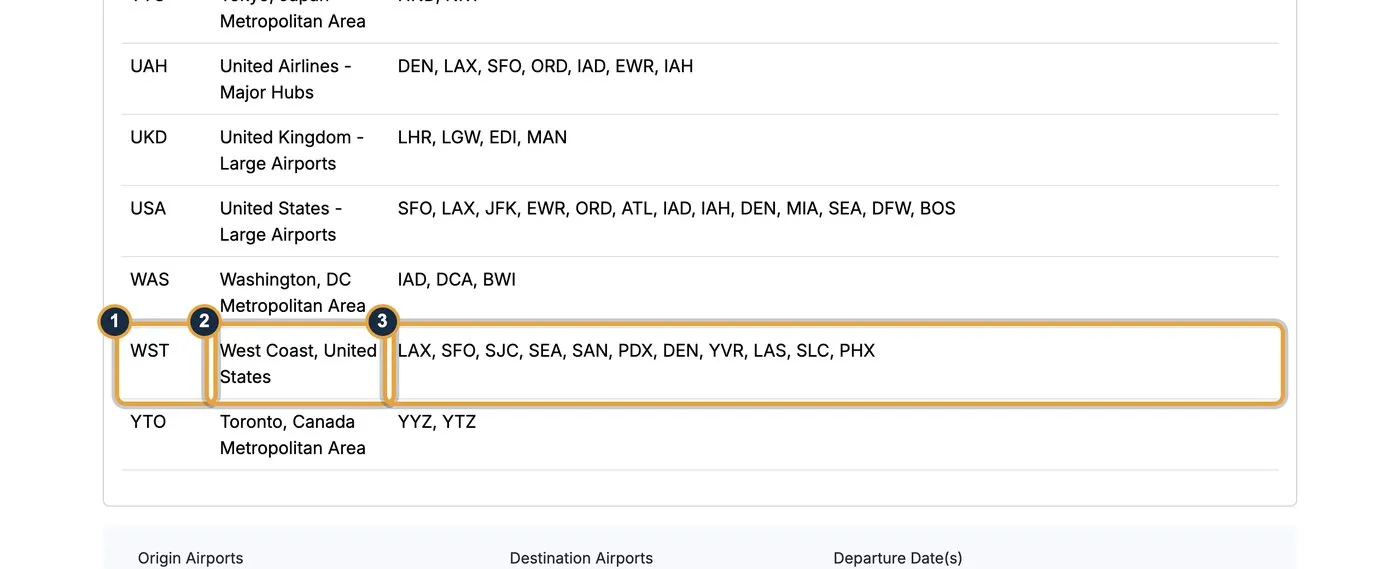
- The code: WST, typed into the airport box like any airport.
- What it covers: West Coast, United States.
- The airports: LAX, SFO, SJC, SEA, SAN, PDX, DEN, YVR, LAS, SLC and PHX, 11 airports in one search.
Other useful codes include NYC for JFK, LaGuardia and Newark, TYO for both Tokyo airports, EUR for 24 large European airports, and UAH for United’s hubs. Codes work as an origin, a destination or both.
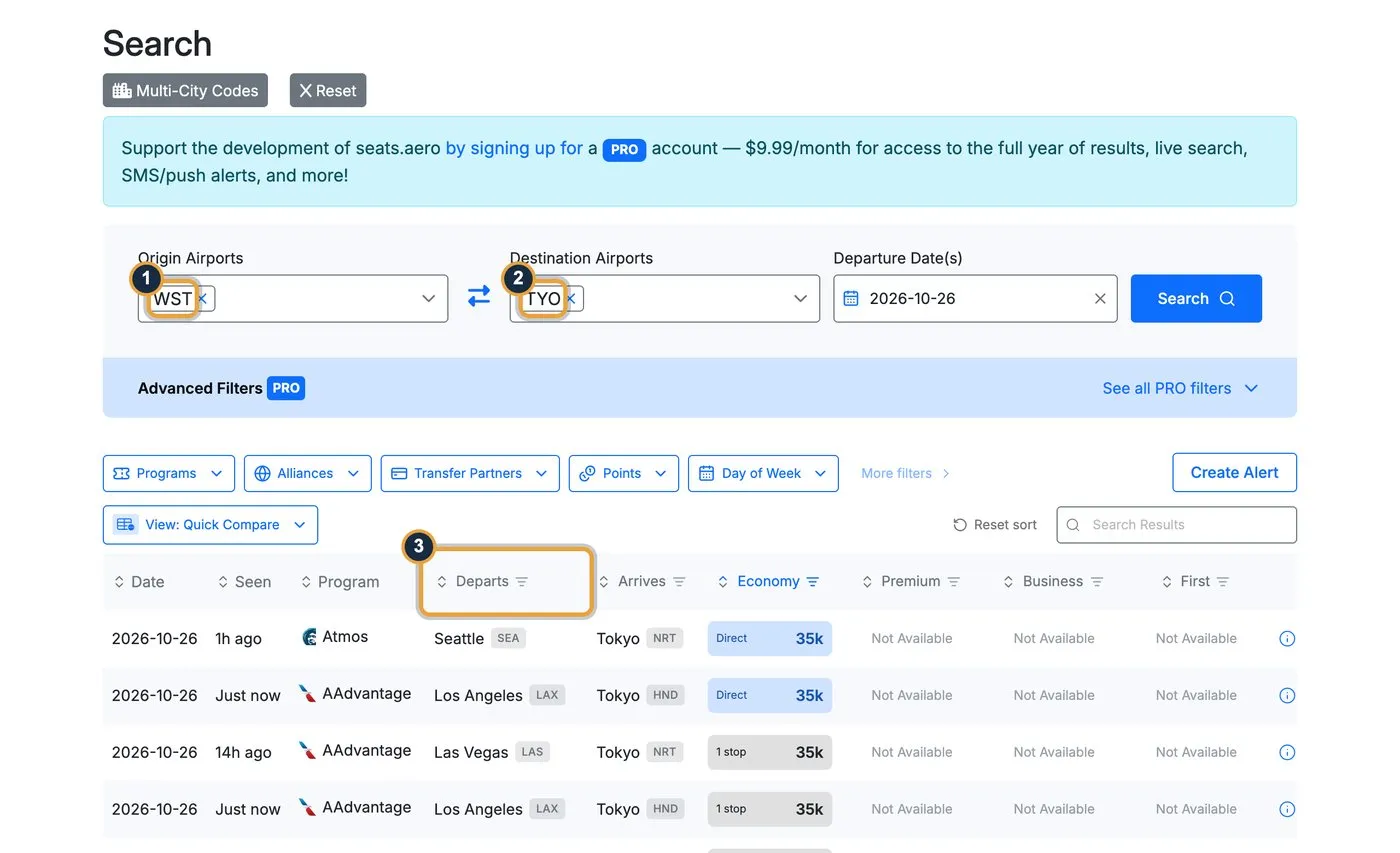
- WST in the origin box.
- TYO in the destination box.
- Departs: the results mix Seattle, Los Angeles and Las Vegas, landing at both Narita and Haneda. Our search for October 26 found Seattle to Narita for 35,000 Atmos Rewards points and Los Angeles to Haneda for 35,000 AAdvantage miles, both nonstop.
Try it yourself with our West Coast to Tokyo search.
Make your own airport group
You can also build your own code. seats.aero’s help article on custom airport codes walks through it: open Settings, choose the Preferences tab, scroll to Custom Airport Codes, press Add Custom Code, enter the airports and save. Your code then works anywhere Search or Alerts take an airport code, so one alert can watch a whole group.
seats.aero’s own examples include a ski group of DEN, EGE, ASE, HDN, MTJ, GUC, SLC, JAC and BZN, and a Bay Area weekend group of OAK, SJC, SMF and SFO. Custom codes live in your account settings, so you need to sign in to create one.
Step 4: read the results
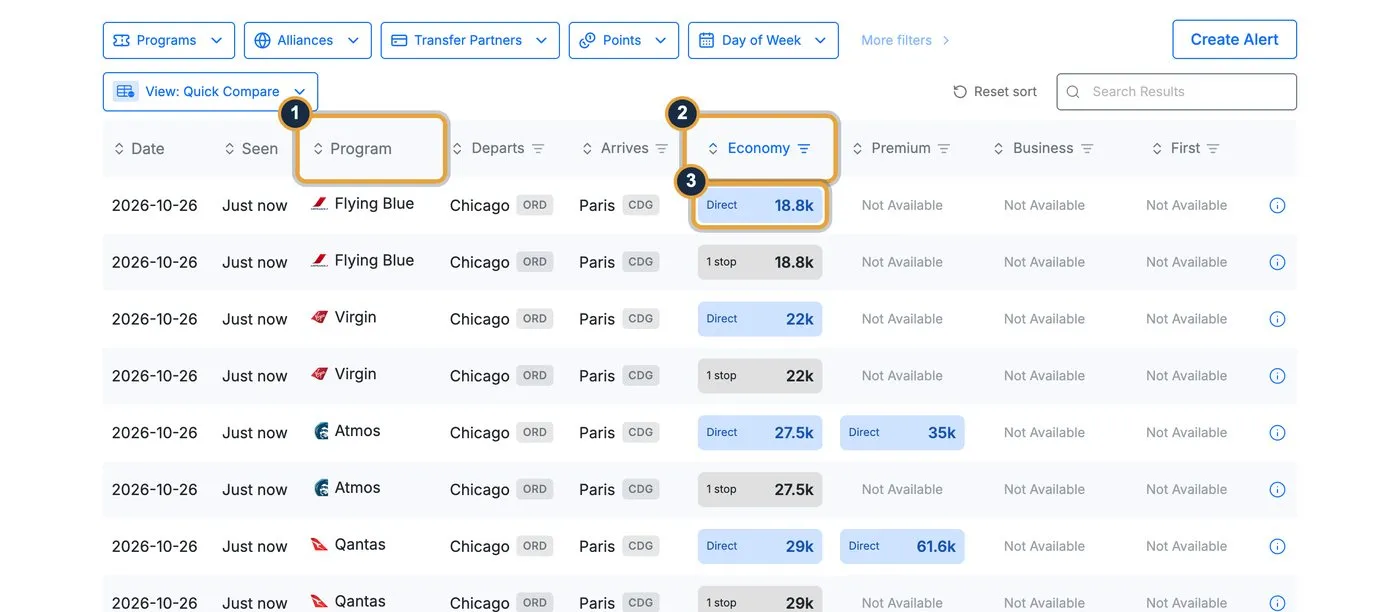
- Program: the mileage program that can book the seat. This is whose miles you’d spend.
- Cabin columns: Economy, Premium, Business and First. Click a column header to sort by price.
- Price chip: the miles needed one way. “Direct” marks a nonstop flight, “1 stop” has a connection, and “Not Available” means no award seats in that cabin. The chip colors can change with your display settings, so read the label.
The “Seen” column shows how fresh each price is, such as “Just now” or “3h ago.” The Search Results box above the table filters the rows as you type, which is handy for one airport or one date in a long list. Here’s what our search showed for nonstop flights on October 26, 2026:
| Program | Economy | Premium economy | Business |
|---|---|---|---|
| Flying Blue | 18,800 miles | Not available | Not available |
| Virgin Atlantic | 22,000 points | Not available | Not available |
| Atmos Rewards | 27,500 points | 35,000 points | Not available |
| Qantas | 29,000 points | 61,600 points | Not available |
| American AAdvantage | 30,000 miles | 52,000 miles | 77,000 miles |
| United MileagePlus | 40,000 miles | Not available | Not available |
The economy seat costs 21,200 fewer miles through Flying Blue than through United. At 1 to 1.5 cents per mile, the range our points valuations guide uses for airline miles, that gap is worth roughly $212 to $318 on one ticket. This comparison is the whole point of the tool.
Step 5: open a flight and check the fees
Click the small info icon at the end of any row to open the flight details.
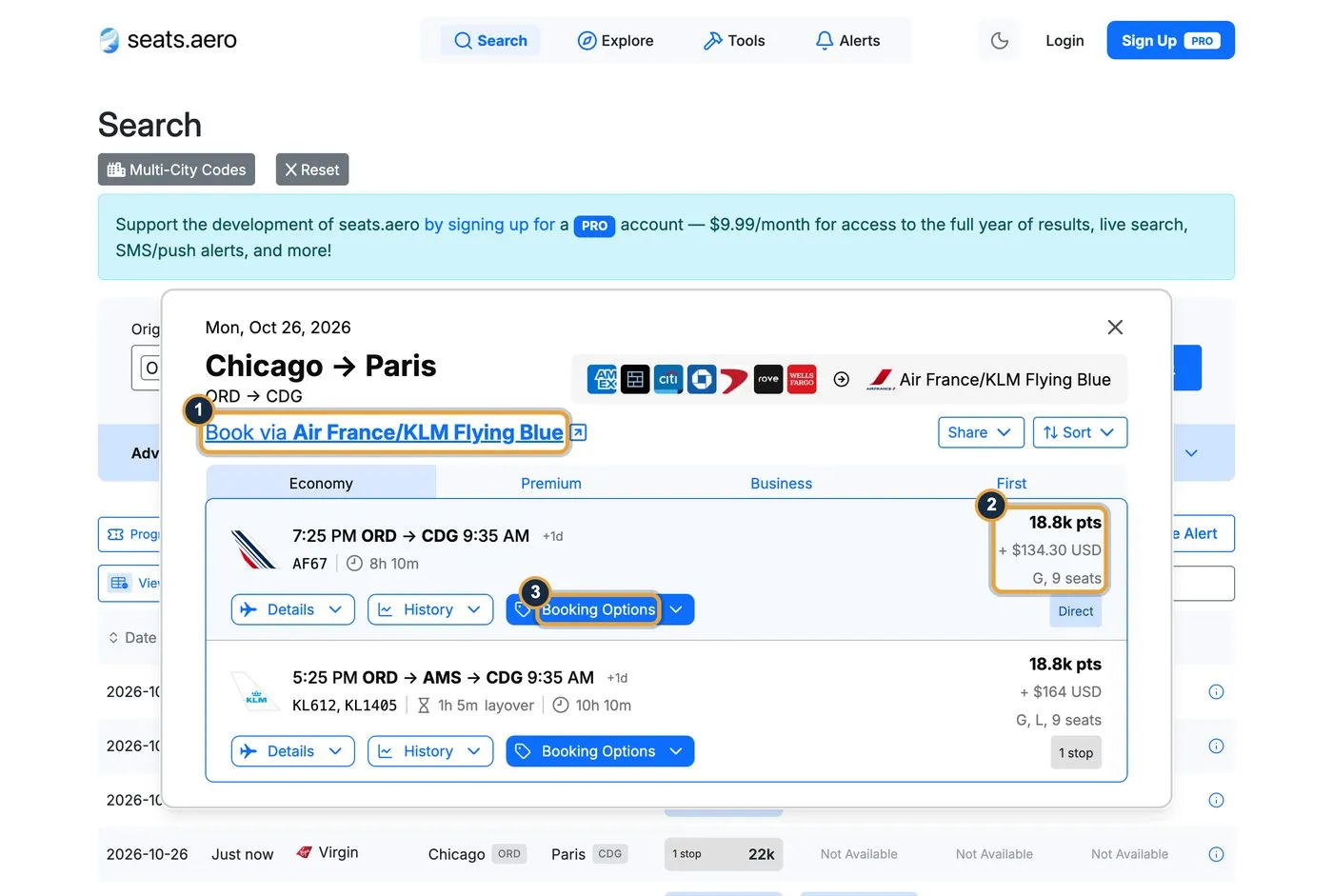
- Book via link: takes you to the program’s own site, Air France/KLM Flying Blue here, where you confirm and book.
- Price block: 18,800 points plus $134.30 in taxes and fees, with 9 seats showing. Always check the cash part. Flying Blue’s fees can run higher than other programs’, and its cheapest fares are the Light awards our Flying Blue fares post explains.
- Booking Options: lists the other programs that can book the same flight.
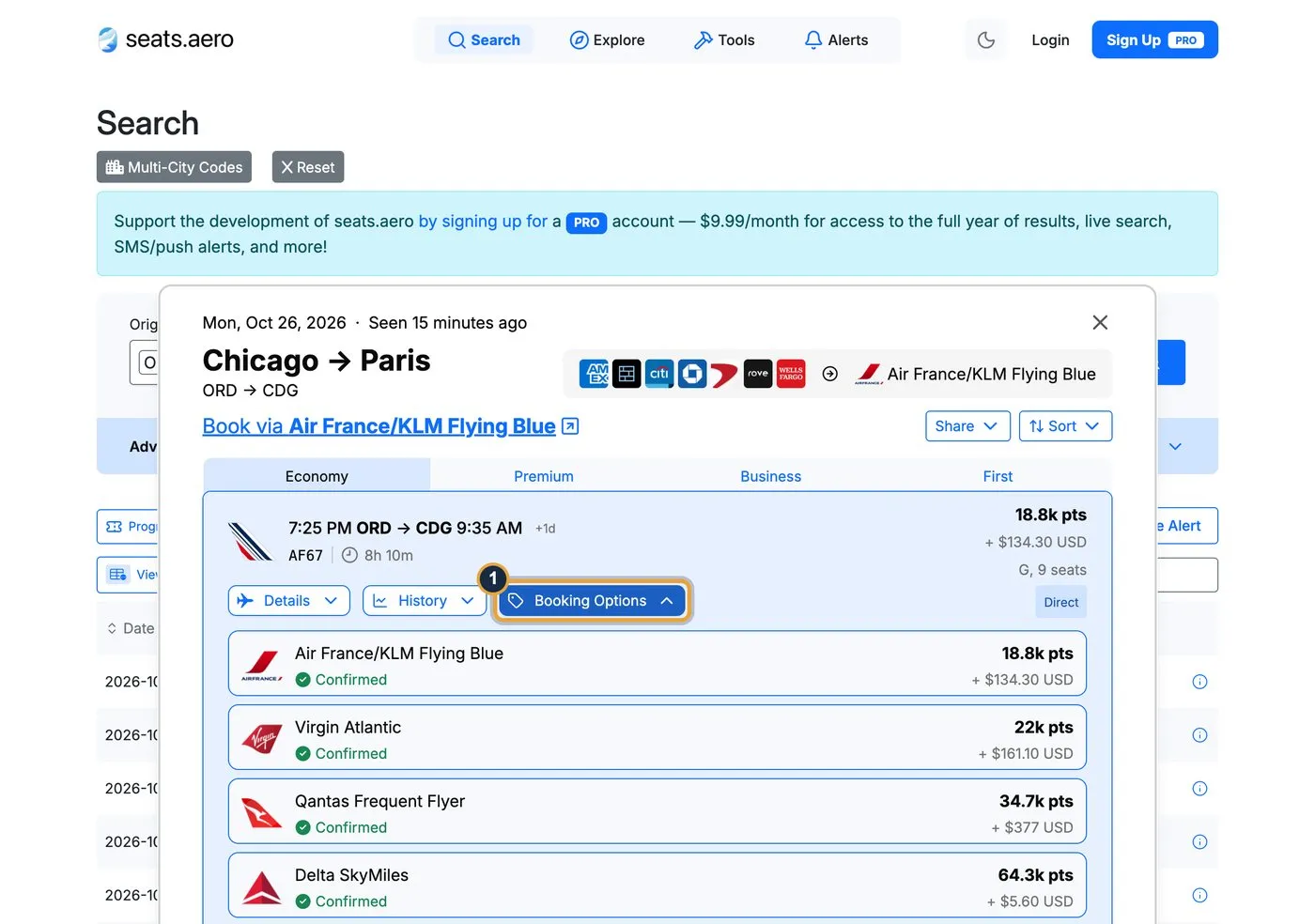
Here’s what Booking Options showed for that Air France flight:
| Program | Status | Points | Taxes and fees |
|---|---|---|---|
| Air France/KLM Flying Blue | Confirmed | 18,800 | $134.30 |
| Virgin Atlantic | Confirmed | 22,000 | $161.10 |
| Qantas | Confirmed | 34,700 | $377 |
| Delta SkyMiles | Confirmed | 64,300 | $5.60 |
| JAL Mileage Bank | Estimate | 37,000 | Unknown |
“Confirmed” means seats.aero saw the seat in that program. “Estimate” means it calculated a likely price without checking. Some estimates also carry flags like “Offline booking only” or “Round-trip required.” Fees matter as much as points: Delta wants 45,500 more points than Flying Blue but $128.70 less in fees.
Two more buttons sit on each flight. Share copies a link to the result, and History shows how the price has changed over time on PRO, as the price history guide explains.
The row of logos at the top shows which banks transfer points to this program.
Step 6: filter by the points you have
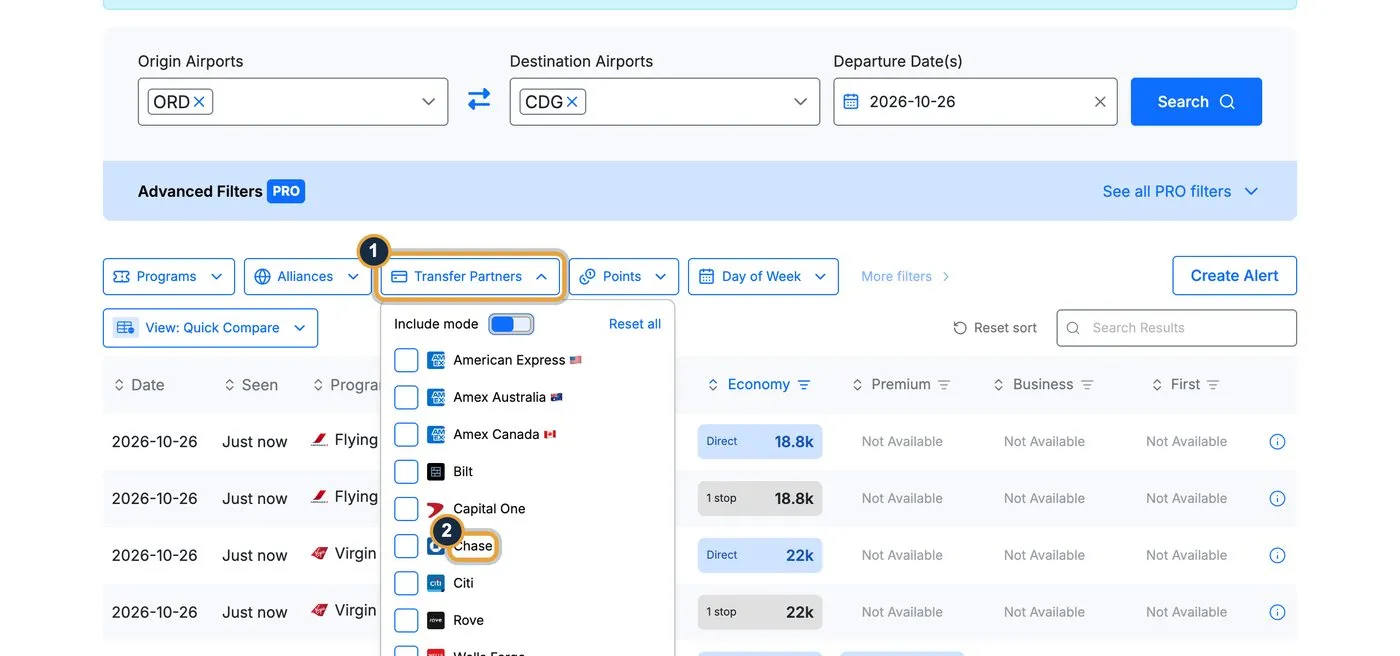
- Transfer Partners: open this filter above the results.
- Pick your bank: tick Chase, for example, and seats.aero keeps only the programs your Chase points can reach.
This is the most useful filter for beginners, because a cheap seat you can’t pay for doesn’t help you. If you don’t hold transferable points yet, our best travel credit cards guide ranks the cards that earn them.
Step 7: hide programs you can’t use
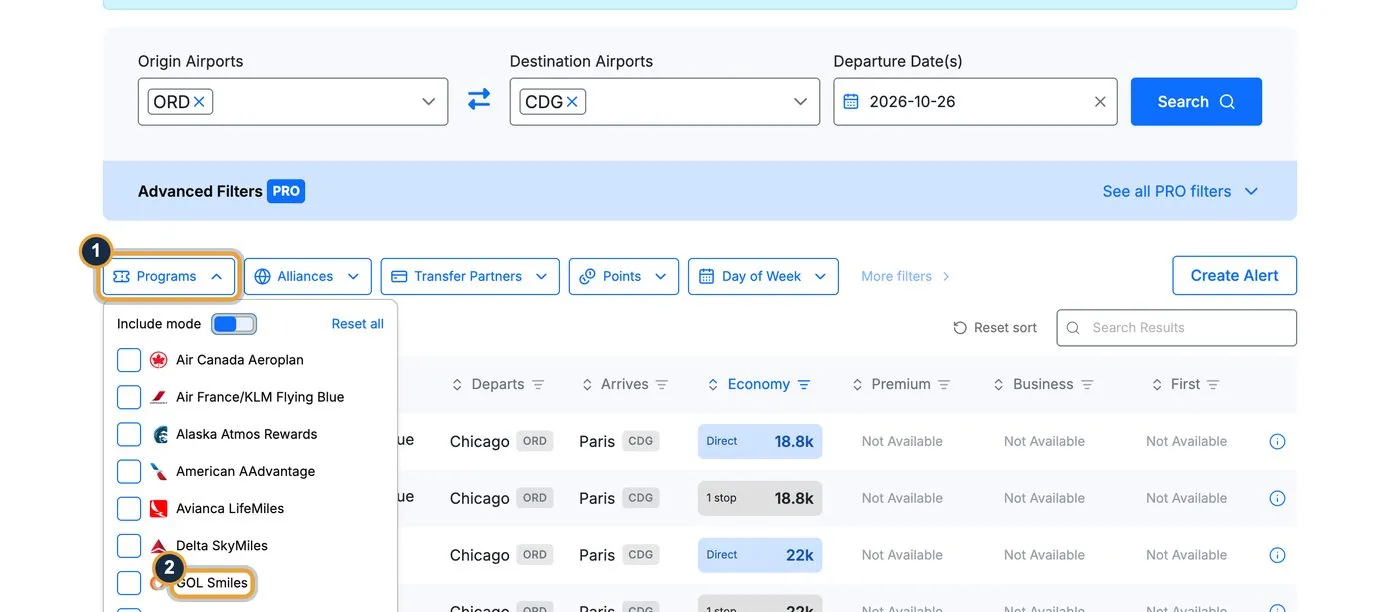
- Programs: open the filter to choose which mileage programs appear.
- Untick the hard ones: seats.aero’s help article on foreign programs gives GOL Smiles and Azul as examples that typically need a Brazilian tax ID to join.
Don’t ignore those results completely, though. A seat showing in a foreign program often means the same flight is open through a partner in the same alliance. seats.aero’s own example is United seats appearing in Azul, which you might book with Air Canada Aeroplan instead. Our STARLUX booking guide walks through the same partner logic for one airline.
Step 8: set an alert
Award seats get released and snapped up at odd hours. Press Create Alert above the results, and seats.aero fills in the route you just searched.
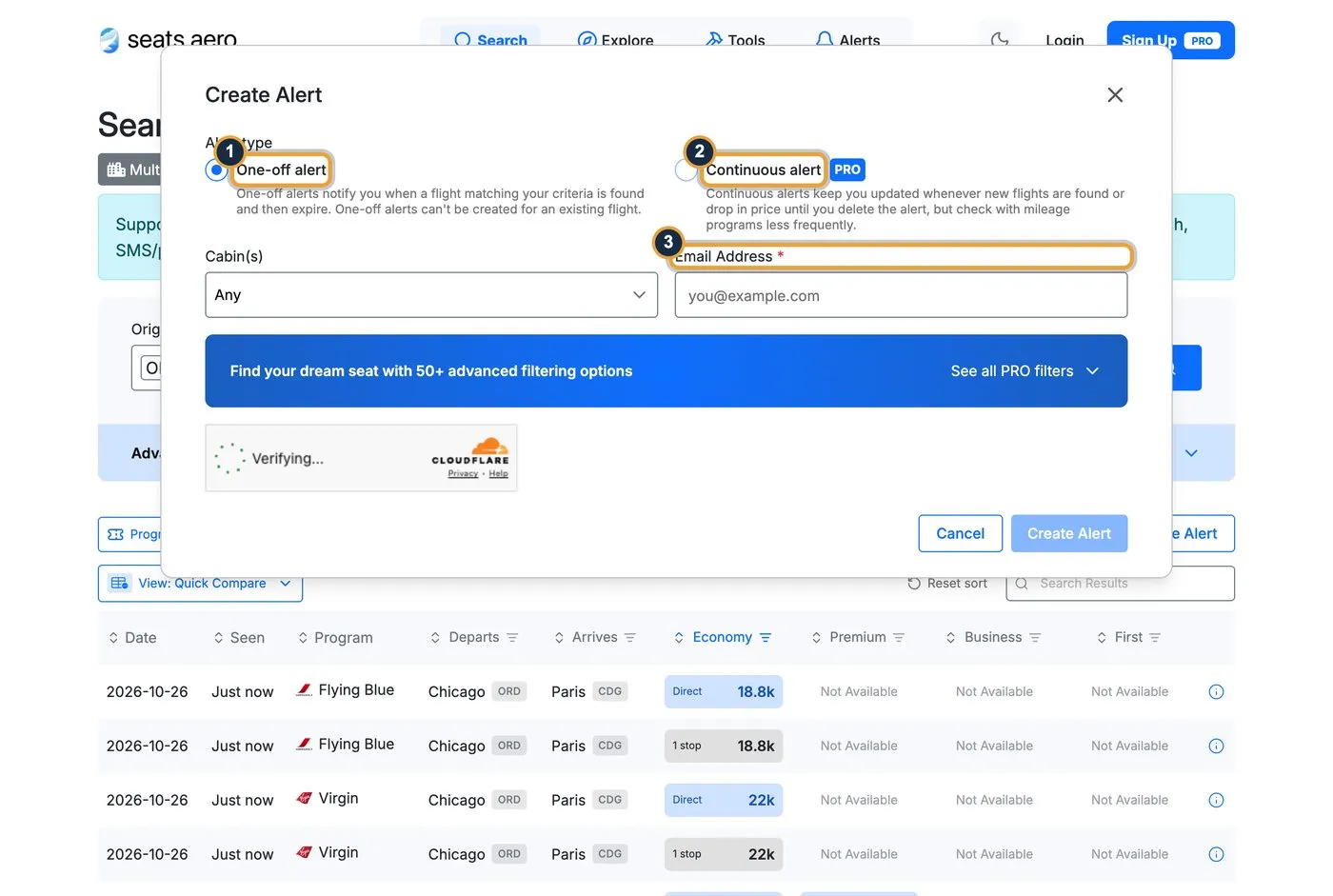
- One-off alert: free. It emails you once when a matching seat appears, then deletes itself. Free alerts cover flights in the next two months, and the help center’s free vs PRO table lists up to 5 active alerts at a time.
- Continuous alert: PRO only. It keeps notifying you about new seats and price drops until you delete it.
- Email Address: where the alert goes. PRO adds text messages too.
You can also start from the alerts page and pick airports, dates, programs and cabins yourself. Alerts only watch nonstop routes seats.aero tracks. If the page says availability already exists, set a maximum points price below today’s price so the alert fires on a cheaper seat. Add alerts@seats.aero to your contacts so the emails don’t land in spam.
Step 9: explore when you don’t have a route yet
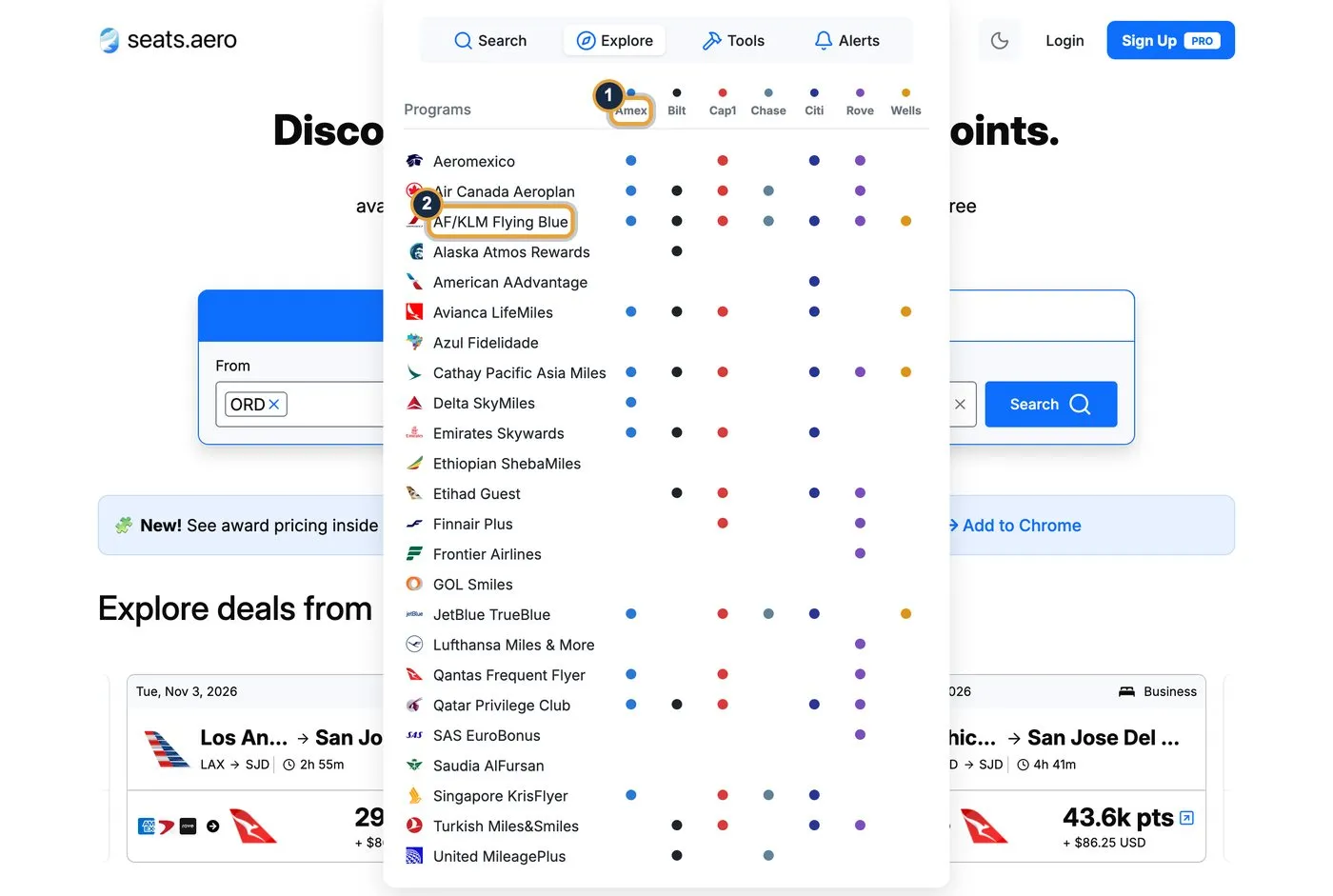
- Bank columns: each dot shows which banks transfer points to that program. It doubles as a quick transfer partner chart, and our transfer partners coverage tracks the ratios.
- Pick a program: click one, Flying Blue here, to see every award flight it has.
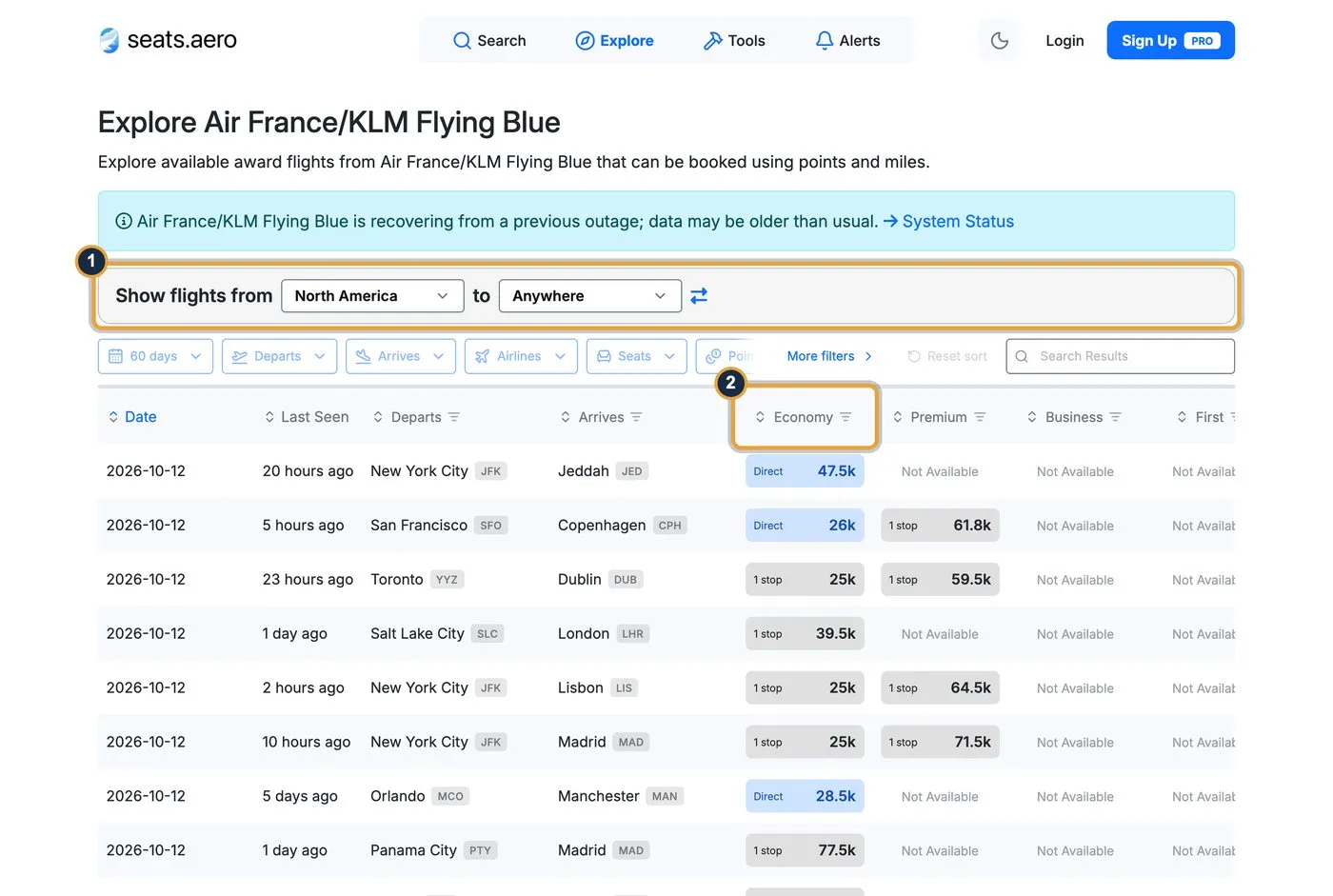
- Regions: choose where you’re leaving from and where you want to go. North America to Anywhere showed 38,028 Flying Blue results.
- Sort by cabin: click Business or Economy to bring the cheapest seats to the top.
Explore covers the most popular routes rather than every route. For anything else, use Search.
Five checks before you transfer points
- Phantom seats. Some programs show space that can’t be booked. seats.aero’s phantom availability article says to check the Last Seen time and confirm on the airline’s site first.
- Seat counts for a family. Air Canada, American, Emirates, Qantas, Qatar and Turkish don’t share how many seats are open. seats.aero’s seat count article warns that “there may be only one seat available to book,” so search one seat at a time when you need several.
- Fees. Compare the cash part in Booking Options, as in the $377 versus $5.60 example above.
- The operating airline. A result filed under one program can fly on a partner airline with its own surcharges. Open the details and check who operates the flight.
- What’s missing. seats.aero doesn’t show mixed-cabin trips, waitlist space or LATAM Pass, and seats released only to elite members or cardholders may not appear. A blank result doesn’t always mean no seats.
From search to booking
- Confirm the seat on the airline’s site. Use the Book via link from Step 5 and search the same date there. seats.aero data can be a few hours old.
- Check which of your points can get there. Flying Blue takes transfers from American Express, Chase, Citi, Capital One, Bilt and Wells Fargo.
- Transfer only what you need. Transfers can’t be reversed, so move points only after you’ve confirmed the seat. Our transfer bonus guide covers the order of steps.
- Book right away. Many transfers post within minutes, and award seats can disappear the same day.
Settings worth changing on PRO
PRO accounts get a Preferences page with a few switches that change what you see:
- Cardholder pricing: shows the lower prices Delta and United cardholders get, such as Delta’s 15% TakeOff discount. seats.aero’s cardholder pricing guide lists the supported cards and statuses.
- Dynamic pricing: expensive dynamically priced awards are hidden by default, and a toggle shows them all.
- Foreign programs: hide programs you can’t join, such as GOL Smiles, from every search.
- Custom airport codes: your own airport groups, covered in Step 3.
More free tools
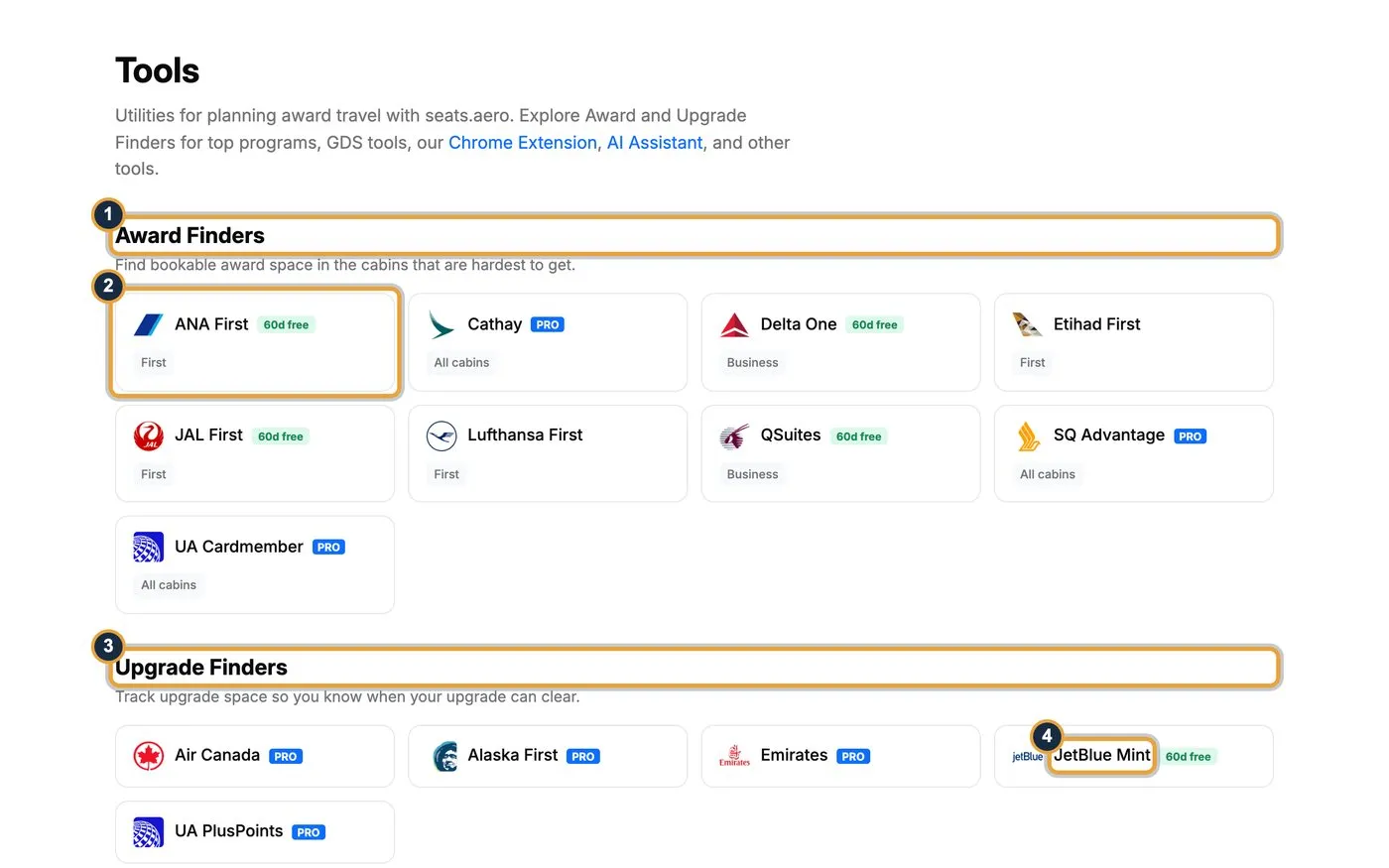
- Award Finders: search the hardest seats to get, by cabin.
- Free finders: ANA First, Delta One, JAL First and Qatar Qsuites are free for the next 60 days. Cathay, Singapore Advantage and United cardmember space need PRO.
- Upgrade Finders: track when an upgrade can clear.
- JetBlue Mint: the one upgrade finder that’s free for the next 60 days. Air Canada, Alaska First, Emirates and United PlusPoints need PRO.
Further down the tools page are free planning tools. Award Release Dates shows when each program opens its calendar, and Routes shows which banks transfer to each program. There’s also a Points or Cash Calculator, a Great Circle Map, Timatic visa checks and route statistics. PRO adds a CPM Explorer and the GDS tools for fares, fare classes and live seat maps.
Beyond the website
- Rooms.aero for hotels: the sister site searches hotel award nights the same way, across Choice, IHG, Hilton, Marriott, Hyatt, I Prefer and Wyndham. It’s free for the entire year with no sign-up, per the rooms.aero help article. Our hotel points coverage tracks those programs.
- Browser extension: shows award prices while you browse Google Flights, Chase Travel and Amex Travel, in Chrome, Firefox, Edge and Brave. It covers nonstop flights in the next 60 days for free.
- Mobile apps: iPhone and Android. Push notifications from the app are the fastest way to get alerts.
- AI tools: an AI Assistant in beta builds itineraries and sets alerts, and an MCP server lets ChatGPT, Claude and other AI assistants search seats.aero for you.

Business class seats we found on October 12
We ran these searches on October 12, 2026, and recorded them for our video the same day. They’re real results from that day, and they’ll most likely be gone by the time you read this. People are searching and booking these routes every day, and cheap business class seats rarely last.
| Route | Date | Airline | Program | Price, one way | Needs PRO? |
|---|---|---|---|---|---|
| Philadelphia to Dublin | Nov 3, 2026 | American Airlines | Atmos Rewards | 45,000 points + $25.60 | No |
| Los Angeles to Manila | Nov 4, 2026 | Philippine Airlines | Atmos Rewards | 85,000 points + $25.60 | No |
| San Francisco to Tokyo Narita | Feb 9, 2027 | United | United MileagePlus | 90,000 miles + $5.60 | Yes |
| Seattle to Taipei | Sep 8, 2027 | Starlux | Atmos Rewards | 75,000 points + $25.60 | Yes |
All four are nonstop business class seats.
- Same seat, three prices: the Philadelphia flight cost 45,000 Atmos points + $25.60, 68,400 Qantas points + $1,504 or 77,000 American miles + $5.60. Fees can matter as much as points.
- United’s 90,000-mile price showed up with seats.aero’s United cardholder setting turned on. United’s February 2026 announcement says about a third of flights with Saver awards have seats only its cardholders and Premier members can book, with Tokyo named as an example.
- Starlux at 75,000 Atmos points appeared on just one date in the next 12 months. Most other dates cost 175,000 points or more.
This is where PRO earns its price. The two Asia deals were about 4 and 11 months away, well past the free two-month window. Without PRO, you’d never see them, and seats that rare get booked by whoever finds them first.
Search a full year with seats.aero PRO
What happens past two months
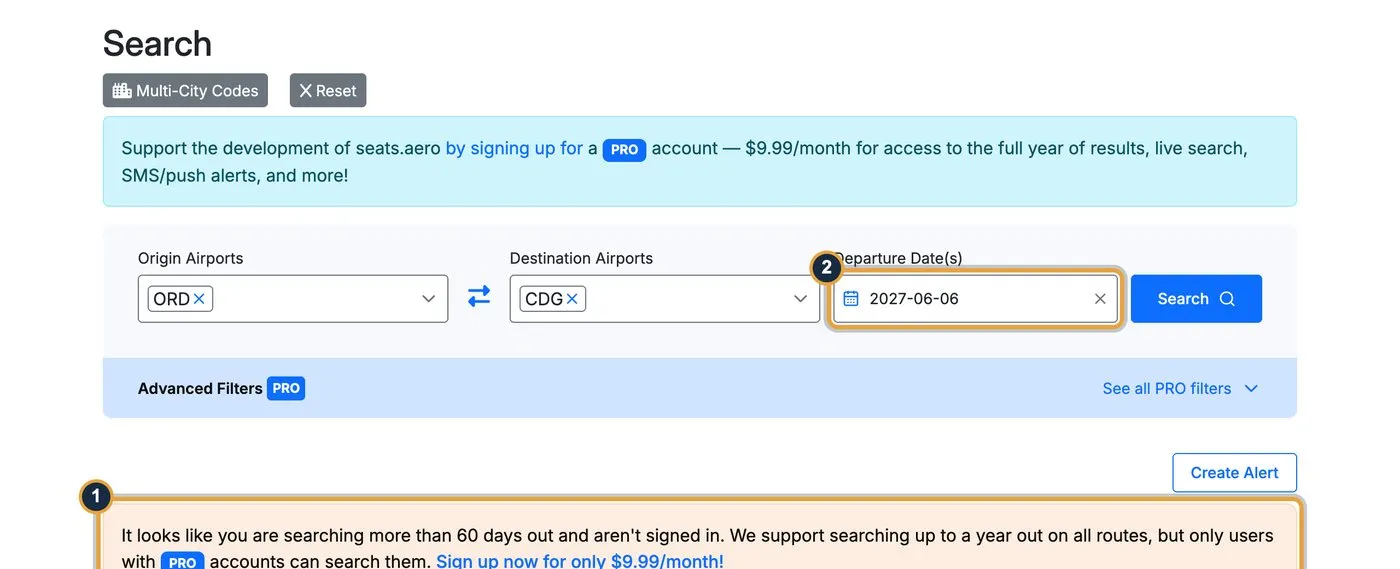
- The paywall: search a date more than 60 days out without PRO, and seats.aero shows this message instead of results.
- The date: June 6, 2027 in our example, the kind of date you’d search for a summer trip.
Is PRO worth $9.99 a month?
For most people, buy it for the month you’re planning a trip, then cancel. The best award seats on popular routes often go months ahead, and a summer trip to Europe usually means searching in winter or spring, when free users can’t see those dates.
Our own October 12 search shows why. Starlux business to Taipei for 75,000 Atmos points sat 11 months out, where free users can’t look.
The math is simple. In our search above, choosing the cheapest program saved 21,200 miles on one economy seat, worth at least $212. One month of seats.aero PRO costs $9.99. If you book even one award a year, a month or two of PRO pays for itself. If you plan trips most months, the $99.99 yearly plan costs less than 11 monthly payments.
Skip PRO if you only travel on short notice inside the two-month window, or if you book one domestic award a year with a single airline’s own site.
The bottom line
seats.aero turns award booking from a dozen website visits into one search. Start free with a trip inside the next two months, filter by the points you hold, open a flight to check the fees, and set a few email alerts. When you plan a trip further out, pay for one month of PRO, book the seat, and cancel.
For more ways to stretch your points, browse our award travel coverage and the other search tools on our travel tools page.
FAQ
Is seats.aero free?
Yes, for flights departing in the next two months. Free users can search and explore without an account, and set one-off email alerts after signing in. PRO costs $9.99 a month or $99.99 a year and extends that to a year out.
Can I book flights on seats.aero?
No. seats.aero finds award availability and links you to the airline program’s site, where you book with that program’s miles or points.
How accurate is seats.aero?
Results come from regular background checks, and each one shows when it was last seen. Confirm the seat on the airline’s own site before you transfer points, since availability can change within hours.
Which mileage programs does seats.aero search?
More than 20, including United MileagePlus, Air Canada Aeroplan, American AAdvantage, Delta SkyMiles, Flying Blue, Virgin Atlantic, Atmos Rewards and Qantas, based on the results our searches returned.
Can seats.aero search round trips?
No. seats.aero only searches one way, per its round-trip article. Run a second search for the return, using the swap arrows to flip the airports.
Should I buy seats.aero PRO in the app or on the website?
On the website. seats.aero says the iOS app price can be higher because of Apple’s fees, and a website subscription still works when you sign in to the app.
Subscribe to the TravelPointsPro newsletter for weekly award deals and transfer bonuses worth your points.